Serverless GitHub Notifications
-
•10 min read
Automation is everything and we want to save time by eliminating as much manual work as possible. If you've found yourself thinking, "I just need a small bit of code to run in response to an event", then you are probably thinking about serverless without even realising it. It's a simple way to run code without managing servers - write code, deploy it and let the cloud provider handle the infrastructure. No servers, no maintenance, just code that runs when it needs to.
Serverless functions have been around for a while now and it's easy to see why they're so popular. They allow developers to focus on writing code without worrying about the underlying infrastructure. You can write functions in various programming languages, deploy them to a cloud provider and it automatically scales based on demand. You only pay for the compute time functions use which makes it cost-effective for many use cases.
That's what drew me to serverless functions when I started working on a project to send GitHub notifications to a Discord channel about new commits. Every time someone pushes code to a repository, GitHub can send a webhook event. But what can you do with that event? For me, it meant using a serverless function to catch those webhook events by listening to incoming requests. Then I could process the data and send formatted messages to Discord. Why pay for a server to run a script that only needs to run when a webhook event is received? Serverless functions are perfect for this kind of task. There's plenty of cloud providers that offer serverless functions but I ended up using Vercel, a platform that makes it easy to deploy serverless functions for free with a generous free tier (this is not sponsored, I just like the service).
What about the built-in integration? #
GitHub already has a way to post to Discord. You can add /github to the end of a Discord webhook URL and GitHub will send its events straight to the channel. It works, but the messages are quite basic. You get a short commit message and an author, and that's about it. I wanted to see how big a change was without having to open the commit, so I wanted the number of files changed, the lines added and removed, the time of the commit and any co-authors.
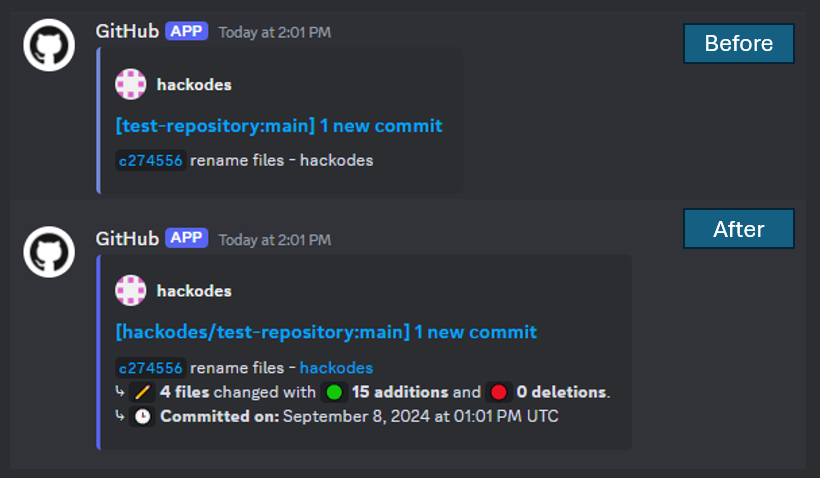
How it works #
The function is a small TypeScript project. Vercel treats anything inside the api folder as a serverless function, so a request to /api/github runs api/github.ts. GitHub tells you what kind of event it is in the x-github-event header, so the function reads that and decides what to do with it:
switch (req.headers['x-github-event']) {
  case 'push':
    await handlePushEvent(req, res)
    break
  case 'pull_request':
    await handlePullRequestEvent(req, res)
    break
  default:
    res.status(400).send('Unsupported event type')
}
The push handler works through each commit in the payload, builds a Discord embed from them and posts it to the webhook URL.
Getting the details GitHub doesn't send #
A push event tells you which commits were pushed, but it doesn't tell you how many lines changed. To get that, the function makes a second request for every commit, to GitHub's API, and reads the stats from the response. This is why the project needs a GitHub access token. A fine-grained token with read-only access to the repository contents is enough.
Co-authors are handled in a slightly cheeky way. When you add someone as a co-author, GitHub stores that as a Co-Authored-By: line at the bottom of the commit message. So the function pulls those lines out with a regular expression, shows the names in the notification and removes the lines from the message so they don't show up twice.
Working around Discord's limits #
Discord is strict about how big a message can be. A single embed can only have 4,096 characters in its description and a message can only have 10 embeds. A push with a lot of commits can easily go over both. So the code splits long descriptions into chunks and splits the embeds into groups of ten. When a push is split up, the title tells you which part you're looking at, e.g. (1/2).
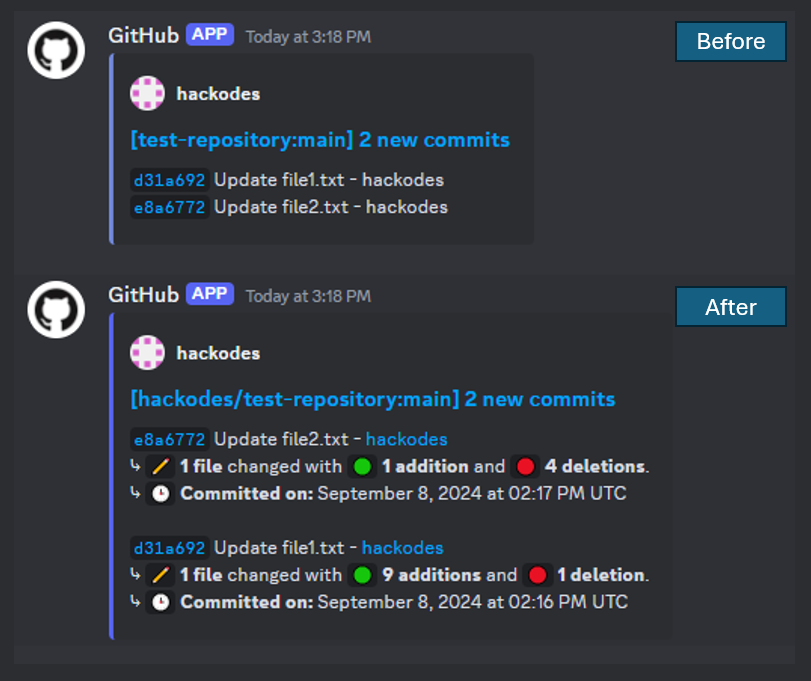
I later added pull request support as well. The embed colour changes depending on whether the pull request has been opened, closed or merged, and the colours can be changed in a config.json file along with the bot's name and avatar.
Setting it up #
Setting it up takes a few minutes. You import the repository into Vercel, add your Discord webhook URL and GitHub token as environment variables and then add a webhook to the repository you want to follow. The full steps are in the README if you want to try it yourself.